Sound familiar?
"Which check pays the rent on the 1st?" - and every month you do the math again.
A surprise bill shows up, and it lands on the card. Again.
You pay the minimum, and the balance barely moves.
You tried an app. Then a free spreadsheet. Too much work, so you stopped.
It's not you. Most budgets are built for one paycheck a month. Yours comes every two weeks.
One screen per paycheck
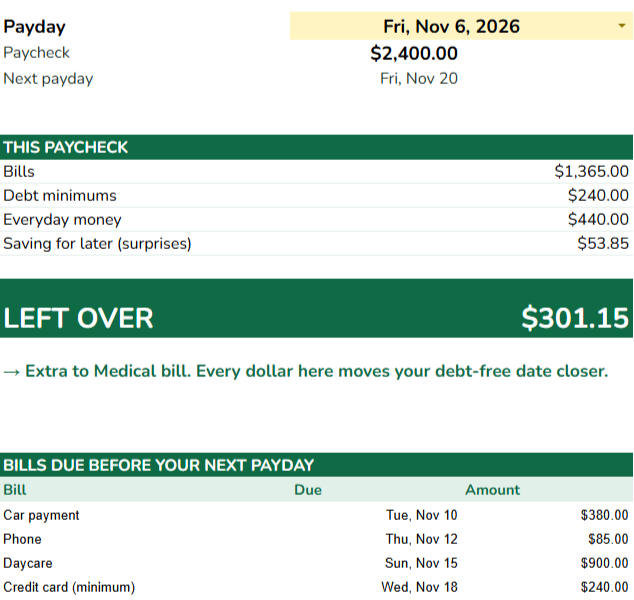
Pick a payday. You see the bills it pays, the money for surprises, and what's left over. If a paycheck is short, it turns red and tells you which bill you could move.
Your leftovers become a debt-free date

Every dollar left over goes to your debt, in the order you choose (smallest first, or highest interest first). You see the month you're debt-free, next to paying only the minimums.
How it works
- Make your copy. One click after you buy. It saves in your own Google Drive.
- Type over the yellow cells. Your paycheck, how often you're paid, your bills and their due days, your debts. About 10 minutes.
- Open My Paycheck. Pick a payday. That's it.
No tracking every coffee. No 12 monthly tabs. You only update it when a bill or your paycheck changes.
What you get
- My Paycheck - which bills this paycheck pays, what to set aside, what's left.
- All Paychecks - every payday ahead, with the extra-paycheck months marked (put those on your debt).
- Debt Free - up to 10 debts, your debt-free month, the interest you save.
- Savings - money set aside for car repairs, Christmas, school, so they don't land on the card.
- A 2-minute setup video and a one-page guide.
An example
Example, not a real person: a single mom paid $2,400 every two weeks, rent, car, daycare, phone, an $8,000 credit card at 24% and a $1,200 medical bill.
This paycheck: bills $1,365, card minimum $240, groceries and gas $440, $53.85 set aside → $301.15 left over, straight to her debt.
Card minimum = interest + 1% of the balance. Illustration only; your numbers will differ.
Questions
- Is it complicated?
- You only type in the yellow cells. Everything else is worked out for you. If you try to change a formula, Google Sheets warns you first.
- Does it work on my phone?
- Yes, in the free Google Sheets app. Setting it up the first time is easier on a computer.
- I get paid weekly / twice a month. Does it work?
- Yes. Pick weekly, every 2 weeks or twice a month. It finds the paycheck that comes before each bill is due.
- Do I have to log every purchase?
- No. It plans your paychecks. It doesn't track your spending.
- Does it work in Excel?
- No, Google Sheets only (free with a Google account).
- There are free budget sheets. Why pay?
- Free sheets show where money went. This one tells you which paycheck pays which bill, and turns every leftover into a debt-free date.
- I've quit budgets before.
- So have most people. This takes about 10 minutes to set up and a minute per payday.
- What if it's not for me?
- You have a 14-day money-back guarantee. Email us within 14 days and we refund you, no questions asked.